

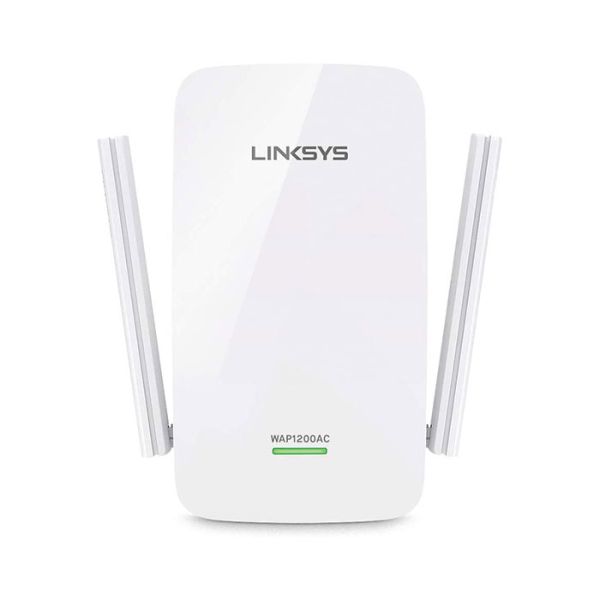
Description: The Linksys WAP1200AC AC1200 Wi-Fi Access Point is the latest in the AC-series access points, which utilizes the Cross Band technology. It can be used as a Wireless Range Extender or a Wired Access Point. Both functions maximize simultaneous use of the 2.4 GHz and 5 GHz bands for high-speed data transfer, uninterrupted streaming, and gaming. Antenna positioning is done depending on the type of home you have. IMPORTANT: The antennas are fixed and can ONLY rotate at 180 degrees. Do NOT force the antennas too far back, otherwise, they will break. For Single-story homes – Both antennas should be pointing down. For Multi-story homes – One (1) antenna should always be pointing down to provide coverage for the current floor. The second antenna (any antenna) should be positioned differently depending on where the Linksys WAP1200AC is located and where the coverage is needed. Product Features Concurrent dual-band (2.4 GHz and 5 GHz) 802.11ac Wireless technology Compatible with 802.11 a/b/g/n Data Rate of up to 300 Mbps for 2.4 GHz and up to 867 Mbps for 5 GHz Two (2) external non-detachable antennas 2 x 2 Spatial Streams One (1) 10/100/1000 Fast Ethernet port with auto MDIX sensing Spot Finder technology (on Range Extender Mode only) Wi-Fi Protected Setup™ (WPS) Browser-based Setup (BBS) Cross Band technology (on Range Extender Mode only) Beamforming technology NOTE: To fix this issue, make sure that your router has an active Internet connection and the Wi-Fi is turned ON. If the router is working fine, unplug the Linksys WAP1200AC then move it closer to the router. Plug it back in, wait for one (1) minute, and reconnect to your network. Ethernet LED – It lights up solid Green when an Ethernet device is connected and active. It will blink when sending or receiving data over the Ethernet port. roduct Requirements Wi-Fi enabled computers or mobile devices AC power outlet Ethernet router or switch with available RJ45 Ethernet port and RJ45 Cable for Access Point mode or wireless network for Range Extender mode For browser configuration: Internet Explorer® 8 or higher Safari® 5.1 for Mac® or higher Google Chrome™ 25.0 or higher Firefox® 20 or higher LED Behaviors Power / WPS LED: OFF – There is no power on the Linksys WAP1200AC. Blinking Green / Yellow – The Linksys WAP1200AC is starting up, resetting to factory defaults, upgrading its firmware, or the WPS connection is in process. Solid Green / Yellow – The Linksys WAP1200AC is ready to use. Solid Amber / Red – There is a weak connection with the router. NOTE: To fix this issue, unplug the Linksys WAP1200AC and move it closer to the router. Blinking Amber / Red – The Linksys WAP1200AC is not connected to the router, or the WPS pairing failed. Product Requirements Wi-Fi enabled computers or mobile devices AC power outlet Ethernet router or switch with available RJ45 Ethernet port and RJ45 Cable for Access Point mode or wireless network for Range Extender mode For browser configuration: Internet Explorer® 8 or higher Safari® 5.1 for Mac® or higher Google Chrome™ 25.0 or higher Firefox® 20 or higher Brand:Linksys Interfaces: One (1) 10/100/1000 Fast Ethernet port with auto MDIX sensing Antenna: Two (2) external non-detachable antennas Standards: 802.11ac Wireless technology
code:10127483
Only logged in customers who have purchased this product may leave a review.
Related Products





Out of stock

Reviews
There are no reviews yet.