

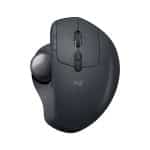
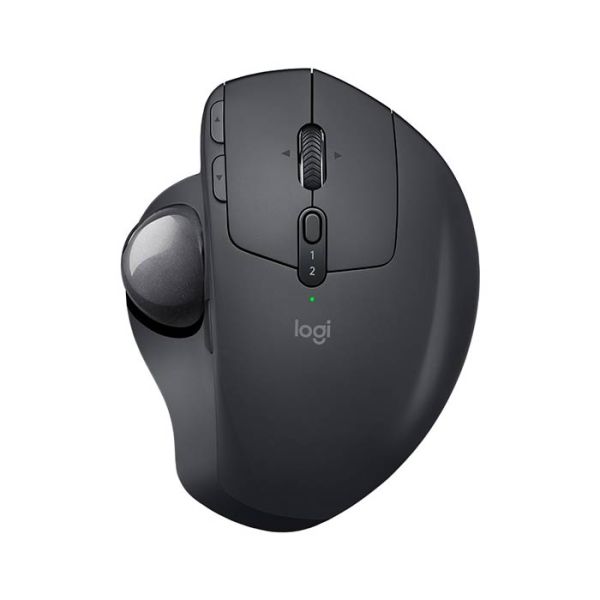
Description: TRACK ON YOUR TERMS Say no to fatigue or discomfort after a long day at work. MX ERGO is crafted for the shape of your hand and built for fast and precise tracking. Adjust your hand and wrist posture with the unique 0 or 20° tilt angle to conquer those lengthy decks and spreadsheets with ease — all the way from start to finish. WATCH VIDEO CUSTOMIZABLE COMFORT THROUGHOUT THE DAY 20% LESS MUSCLE ACTIVITY 1Than a regular mouse. IMPROVED FOREARM POSTURE WITH A 20-DEGREE ANGLE LESS MOVEMENT, BETTER POSTURE With no need to move the hand around to move the cursor, you can minimize movement and maximize performance. The trackball creates 20% less muscle fatigue in your hand, wrist, and forearm than a regular mouse. Plus, the unique adjustable tilt of MX ERGO lets you choose a 0 or 20° angle and instantly improve your wrist and forearm posture. Cruise through your workday with more comfort, ease, and focus on what needs to be done. FULL PALM SUPPORT Work in comfort — even in the limited space at home. The hand-crafted shape of MX ERGO ensures full palm support, while the soft rubber offers a comfortable grip. MORE CONTROL AND PRECISION Easy thumb control makes excellent tracking and accuracy part of your daily routine. The precision mode button (DPI) lets you seamlessly switch between precision and fast-tracking modes. MULTI-COMPUTER WORKFLOW Seamlessly control two computers with your Flow-enabled MX ERGO by simply moving the cursor to the edge of the screen. Your trackball seamlessly flows with you, even between Windows® and macOS and lets you transfer text, images, and files between computers. Just copy on one and paste into another.2Requires Logitech Options software, available for macOS and Windows. YOU’VE GOT OPTIONS WORKS ANYWHERE YOU WORK Since you don’t need to move your hand around, MX ERGO is great for tight workspaces and busy desks. Plus, you can track smoothly on any surface. Get the most out of your trackball no matter where you work. PRECISION SCROLL WHEEL WITH TILT Get things done faster with the quick access to shortcuts. The precision scroll wheel features horizontal scrolling and a convenient middle click. WORK FASTER WITH APP-SPECIFIC CUSTOMIZATIONS MX Ergo is fully customizable in every app you use—and you’ll work faster with predefined app-specific profiles in app in Adobe Photoshop®, Adobe Premiere Pro, Final Cut Pro, Google Chrome™, Safari, and Microsoft Word®, Excel® and PowerPoint®. Defaults Photoshop Video Editing Browser Video Calls Word Powerpoint Excel Boost your productivity witheasy shortcuts. Undo/redo inone click.BACK/FORWARD BUTTONSCustomizable middle click,right/left tilt, and vertical scrolling.PRECISION SCROLL WHEELDefine two tracking speedmodes and switch from precisionto fast tracking.PRECISION MODE BUTTONConnect to two different devicesand switch from one to the other.EASY-SWITCH BUTTON Vertical ScrollingSCROLLINGUNDO/REDOBrush Size (- / +)TILT LEFT & RIGHTPan (Hold & Move)MIDDLE CLICKADJUST DPI MODE(100DPI)CONNECT & SWITCHBETWEEN TWO DEVICES Vertical ScrollingSCROLLINGUNDO/REDOTimeline HorizontalscrollingTILT LEFT & RIGHTPan (Hold & Move)MIDDLE CLICKADJUST DPI MODE(100DPI)CONNECT & SWITCHBETWEEN TWO DEVICES Scroll up / downSCROLLINGBACK/FORWARD INBROWSERSwitch TabTILT LEFT & RIGHTOpen TabMIDDLE CLICKADJUST DPI MODE(100DPI)CONNECT & SWITCHBETWEEN TWO DEVICES STOP/START VIDEOMUTE/UNMUTE MIC Scroll up/downSCROLLINGUNDO/REDOZoom in/outTILT LEFT & RIGHTAutoScrollMIDDLE CLICKADJUST DPI MODE(100DPI)CONNECT & SWITCHBETWEEN TWO DEVICES Vertical Scroll (Changeslides)SCROLLINGUNDO/REDOZoom in/outTILT LEFT & RIGHTPanMIDDLE CLICKADJUST DPI MODE(100DPI)CONNECT & SWITCHBETWEEN TWO DEVICES Scroll up/downSCROLLINGUNDO/REDOHorizontal scrollTILT LEFT & RIGHTPanMIDDLE CLICKADJUST DPI MODE(100DPI)CONNECT & SWITCHBETWEEN TWO DEVICES Boost your productivity with easyshortcuts. Undo/redo in oneclick.BACK/FORWARD BUTTONSCustomizable middle click, right/left tilt,and vertical scrolling.PRECISION SCROLL WHEELDefine two tracking speed modes andswitch from precision to fast tracking.PRECISION MODE BUTTONConnect to two different devices andswitch from one to the other.EASY-SWITCH BUTTON Brush Size (- / +)TILT LEFT & RIGHTPan (Hold & Move)MIDDLE CLICKUNDO/REDOVertical ScrollingSCROLLINGADJUST DPI MODE (100DPI)CONNECT & SWITCH BETWEENTWO DEVICES Timeline Horizontal scrollingTILT LEFT & RIGHTPan (Hold & Move)MIDDLE CLICKUNDO/REDOVertical ScrollingSCROLLINGADJUST DPI MODE (100DPI)CONNECT & SWITCH BETWEENTWO DEVICES Switch TabTILT LEFT & RIGHTOpen TabMIDDLE CLICKBACK/FORWARD IN BROWSERScroll up / downSCROLLINGADJUST DPI MODE (100DPI)CONNECT & SWITCH BETWEENTWO DEVICES MUTE/UNMUTE MICSTOP/START VIDEO Zoom in/outTILT LEFT & RIGHTAutoScrollMIDDLE CLICKUNDO/REDOScroll up/downSCROLLINGADJUST DPI MODE (100DPI)CONNECT & SWITCH BETWEENTWO DEVICES Zoom in/outTILT LEFT & RIGHTPanMIDDLE CLICKUNDO/REDOScroll up/downSCROLLINGADJUST DPI MODE (100DPI)CONNECT & SWITCH BETWEENTWO DEVICES Horizontal scrollTILT LEFT & RIGHTPanMIDDLE CLICKUNDO/REDOScroll up/downSCROLLINGADJUST DPI MODE (100DPI)CONNECT & SWITCH BETWEENTWO DEVICES Boost yourproductivity witheasy shortcuts.Undo/redo in oneclick.BACK/FORWARDBUTTONSCustomizable middle click,right/left tilt, and verticalscrolling.PRECISION SCROLL WHEELDefine two tracking speedmodes and switch fromprecision to fast tracking.PRECISION MODEBUTTONConnect to twodifferent devicesand switch from oneto the other.EASY-SWITCHBUTTON Brush Size (- / +)TILT LEFT & RIGHTPan (Hold &Move)MIDDLE CLICKUNDO/REDOVertical ScrollingSCROLLINGADJUST DPI MODE(100DPI)CONNECT &SWITCH BETWEENTWO DEVICES Timeline HorizontalscrollingTILT LEFT & RIGHTPan (Hold &Move)MIDDLE CLICKUNDO/REDOVertical ScrollingSCROLLINGADJUST DPI MODE(100DPI)CONNECT &SWITCH BETWEENTWO DEVICES Switch TabTILT LEFT & RIGHTOpen TabMIDDLE CLICKBACK/FORWARDIN BROWSERScroll up / downSCROLLINGADJUST DPI MODE(100DPI)CONNECT &SWITCH BETWEENTWO DEVICES STOP/START VIDEOMUTE/UNMUTE MIC Zoom in/outTILT LEFT & RIGHTAutoScrollMIDDLE CLICKUNDO/REDOScroll up/downSCROLLINGADJUST DPI MODE(100DPI)CONNECT &SWITCH BETWEENTWO DEVICES Zoom in/outTILT LEFT & RIGHTPanMIDDLE CLICKUNDO/REDOScroll up/downSCROLLINGADJUST DPI MODE(100DPI)CONNECT &SWITCH BETWEENTWO DEVICES Horizontal scrollTILT LEFT & RIGHTPanMIDDLE CLICKUNDO/REDOScroll up/downSCROLLINGADJUST DPI MODE(100DPI)CONNECT &SWITCH BETWEENTWO DEVICES LONG-LASTING AND FAST TO RECHARGE Focus on work and worry less about charging with the battery that holds power for up to 4 months3Battery life may vary based on user and computing conditions on a full charge. One minute of charge gives up to a full day of use. 120 DAYSON A FULL CHARGE 24 HOURSOF USE FROM 1 MINUTE CHARGE MICRO-USB PORT EASY-TO-REMOVE BALL FOR EASY CLEANUP Cleaning the trackball is a snap. You can easily eject the ball with the back of a pen through the dedicated hole on the bottom of the trackball. USER TESTED. ERGONOMIST-APPROVED. MX ERGO has been designed and tested with criteria set out by leading ergonomists—improving posture and lowering muscle strain.
code:10151925
Only logged in customers who have purchased this product may leave a review.


Reviews
There are no reviews yet.